Keep all five fingers on the board
A quick game for one hand on iPhone and iPad. Press the lit cell and hold it. When all five fingers are down, lift the glowing one and press the new cell.
 Coming soon
Press HOLD and don't let go
A lit cell says HOLD. Put a finger on it and keep it there, then press the next one. Every finger stays on the board: if one comes off, the round is over.
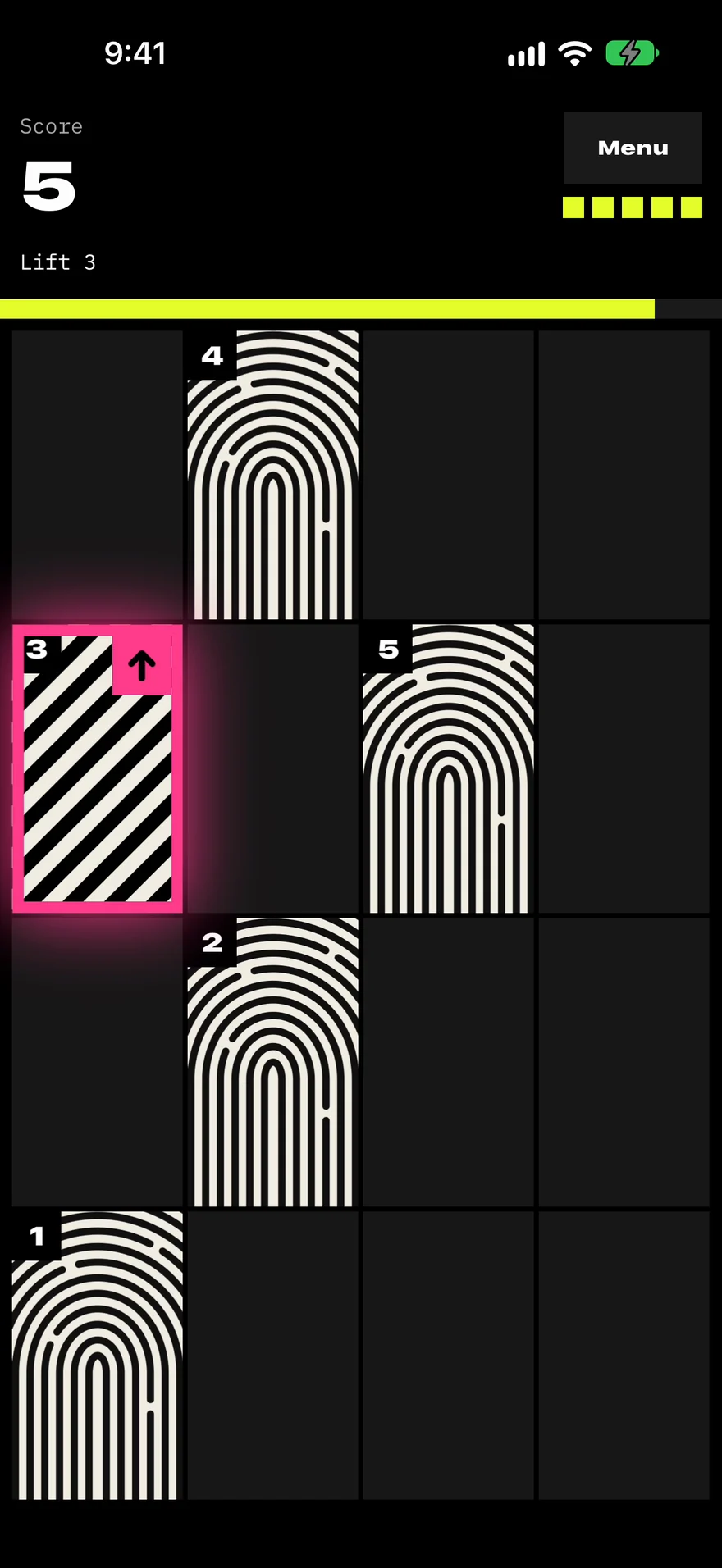
Lift the glowing finger when all five are down
The phone tracks five fingers. With all five on the board, one of them glows, and no new cell lights up until you lift it. Lift a different finger and the round is over.
HOLDPut a finger here.
Finger 3It stays down.
Lift 2Only this one comes up. In a game for two the glow is acid yellow.
Keep up as the moves get faster
The first moves give you seven seconds each. Every five moves take one second off, down to three. On every tenth move the score flashes.
A second of the moveTwo more in Calm modeOn moves 10 and 20 the score flashes
Play together on one screen
Blue and Pink take turns pressing cells in their color. When all five fingers are down, the glowing one belongs to the player who just moved, and they get half the move to lift it. Let a finger slip, lift the wrong one or run out of time, and the other player wins.
Watch a whole round with sound
From the main screen to the last finger in 27 seconds, with the game's own drum machine.
- TickA new cell lights up, and the countdown before a round.
- Five drumsA finger goes down. Each count from one to five has its own note.
- LiftFive are down, one has to come up.
- PopThe right finger came up.
- HurryTwo seconds left on the move. Calm mode leaves it out.
- WinEvery tenth move, and a new best score.
- MissA press on the wrong cell. It costs nothing.
Write to us if something goes wrong
Questions, bugs or ideas go to the developer by email. We answer every message.
There is no sound
Turn off Silent mode: the game stays quiet when the phone is set to silent. Then check Sound in Settings, under the gear on the main screen.
The game paused
A call, Control Center or switching apps lifts every finger, so the game pauses instead of ending the round. Put your fingers back on the blinking cells.
It says the phone sees only 5 fingers
iPhone tracks five fingers at once. A sixth one makes it drop the touches. Put five fingers back on the blinking cells.
Why did the round end?
A finger came off, the wrong finger was lifted, or time ran out. Pressing an empty cell by mistake costs nothing.
Put your hand on the board

- No ads, no accounts, no network. Settings and your best score stay on the device and go away with the game.
- Solo for a best score, or two players on one phone or iPad.
- For iPhone and iPad with iOS 18.2 or later. In English and Russian.
Coming soon